Advanged Applications
Multi Application
QDNS allows multiple applications to run on one device at same time. With this design, one application can run a protocol with a target device, while another application in same device can run a different protocol with any device it is connected to.
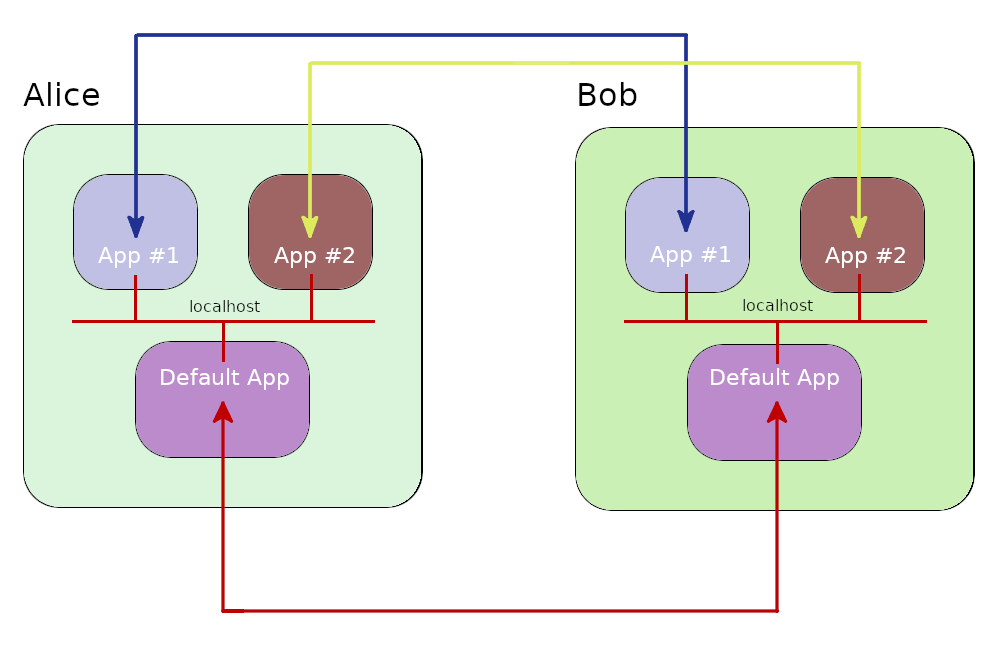
In the following application Alice will send data from default application to Bob. Bob will then send this data to its secondary application via localhost. The secondary application will resend the data it receives to Alice:
import QDNS
import logging

class Alice(QDNS.Node):
    def __init__(self):
        super().__init__("Alice")
        self.create_new_application(self.alice_default_app)
        self.create_new_application(self.alice_second_app, label="second_app")

    @staticmethod
    def alice_default_app(default_app: QDNS.Application, *user_args):
        # Send Bob a data.
        default_app.send_classic_data("Bob", "Hello {}!".format(default_app.label))

    @staticmethod
    def alice_second_app(second_app: QDNS.Application, *user_args):
        # Wait data from Bob.
        package = second_app.wait_next_package()
        print("{}::{}: {}".format(second_app.host_label, second_app.label, package.data))

class Bob(QDNS.Node):
    def __init__(self):
        super().__init__("Bob")
        self.create_new_application(self.bob_default_app)
        self.create_new_application(self.bob_second_app, label="second_app")

    @staticmethod
    def bob_default_app(default_app: QDNS.Application, *user_args):
        # Wait data from Alice.
        package = default_app.wait_next_package()
        print("{}::{}: {}".format(default_app.host_label, default_app.label, package.data))
        default_app.put_localhost(package.data)

    @staticmethod
    def bob_second_app(second_app: QDNS.Application, *user_args):
        # Wait data from localhost.
        data = second_app.localhost_queue.get()[1]
        print("{}::{} Local: {}".format(second_app.host_label, second_app.label, data))
        second_app.send_classic_data("Alice", data)

def main():
    logging.basicConfig(level=logging.WARNING)

    alice = Alice()
    bob = Bob()
    net = QDNS.Network(alice, bob)
    net.add_channels(alice, bob)

    frames = {2: {1:1}}
    conf = QDNS.BackendConfiguration(QDNS.CIRQ_BACKEND, 1, frames)
    sim = QDNS.Simulator()
    sim.simulate(net, conf)

if __name__ == '__main__':
    main()
WARNING:QDNS::Kernel::Backend:CIRQ backend is prepaired for simulation. Prepairation time: ~0.103 sec
Bob::default_app: 'Hello default_app!'
Bob::second_app Local: 'Hello default_app!'
Alice::second_app: 'Hello default_app!'
WARNING:QDNS::Alice:Device simulation is idled after 1.0019 seconds.
WARNING:QDNS::Bob:Device simulation is idled after 1.0013 seconds.
WARNING:QDNS::Kernel:Simulation is ended in 1.2555 seconds. Real raw time: 0.0164
Creating new applications
There is actually no need to create a whole class for Nodes as our examples does. The only thing Node needs to know is application method and bind it. Below is how a node can create an application:
def create_new_application(
        self, function, *args, label: Optional[str] = None,
        static=None, enabled=None, end_device_if_terminated=None,
        bond_end_with_device=None, delayed_start_time=None
):

    """
    Creates new application.

    Args:
        function: Function of application.
        label: Label of application, default is "default".
        static: Setts application static.
        enabled: Setts application enabled.
        end_device_if_terminated: Ends device simulation if application is termiated.
        bond_end_with_device: Ends device simulation if application is finished.
        delayed_start_time: Starts application after delay.

    Examples:
    =================================================
    >>> self.create_new_application("function: bob_run", *args)
    >>> self.create_new_application("function: alice_run", *args, label="alice_app")
    >>> self.create_new_application("function: bob_run", *args, static=True)
    >>> self.create_new_application("function: bob_run", *args, enabled=False)

    See QDNS/device/applicaion.Application() for more details.

    Raises:
        ValueError: Same name application in device.

    Return:
        Application or None.
    """
Static flag marks the application for state tracking.
With this mark, application manager can detect applications that contains never ending while loops.
So even threads of these kind of applications shows as alive, simulation kernel terminates them when simulation going to be over soon.
QDNS allows to passing values to application before simulation when creating a new application.
Application Manager
When a device is created, an application manager module is created. This module manages how applications can be created, treated, terminated. Here is how to set new application manager settings:
new_setting = QDNS.ApplicationManagerSettings(
    max_application_count=4,
    enable_localhost=True,
    disable_user_apps=False
)

alice = QDNS.Device("Alice", app_manager_settings=new_setting)

# OR QDNS.change_default_application_manager_settings(new_setting)